A Property Meld alternative for in-house maintenance teams
Looking for a Property Meld alternative? Invendoory is maintenance management software for in-house crews, built on a record of what is installed in every unit.
Where Property Meld is strong, and who it fits
Property Meld describes itself as property maintenance software for property managers and their teams. It centralizes maintenance work, which it calls Melds, and connects the people involved. Its site names communication, scheduling, oversight and data, MAX intelligence, TrueCost and Vendor Nexus, a vendor-facing area.
It serves single-family, multi-family, HOA and student housing, and its stakeholders include residents and vendors. Its pricing page works best “with management companies overseeing 100+ doors”. Its integrations page lists AppFolio, Buildium, Rent Manager, Propertyware, Yardi and Rentvine, plus zInspector and RentCheck for inspections.
If your problem is coordinating residents, outside vendors and schedules, with a property management system connected, Property Meld is built for that. Invendoory’s strength is different. For another maintenance operations platform, see the HappyCo alternative comparison.
Property Meld alternative comparison table
Invendoory facts come from our product. Property Meld facts come from its own public pages, listed under Sources. Where a page did not mention a capability, the cell says so instead of guessing.
| Capability | Invendoory | Property Meld |
|---|---|---|
| Core job | Inventory, inspections, turns, work orders and parts for in-house crews | Coordinates maintenance work among managers, residents, vendors and technicians |
| Work orders | One list of requests and work orders; parts come from the catalog and reduce stock | Melds with communication, scheduling and oversight |
| Resident and vendor access | Staff roles only: Leasing can file requests; no resident or vendor portal | Residents and vendors take part; Vendor Nexus is a vendor-facing area |
| Item-level unit inventory | Item-level record for every unit: make, model, serial, install date, warranty, up to 20 photos per item | Not listed on their site |
| Inventory updates itself from work orders | Yes. A verified turn or a completed replacement updates the unit's inventory, with history | Not listed on their site |
| Inspections | Scored quarterly, annual and quick templates; low ratings raise areas of concern that become a work order or turn task | Integrates with zInspector and RentCheck for inspections |
| Make ready turn sheets | Make Ready Schedule: one turn sheet per unit, turned in by a tech and verified by a manager | Not listed on their site |
| Parts and supplies stock | Parts & Supplies catalog with stock, ordering and compatible parts per item | Not listed on their site |
| Insurance inventory, prorated charges, loss detection | Insurance Inventory with depreciated values, Prorate Calculator, Renovation Mix, Loss Detection | Not listed on their site |
| Integrations | None. Imports units from AppFolio or Buildium spreadsheet exports | AppFolio, Buildium, Rent Manager, Propertyware, Yardi, Rentvine, zInspector, RentCheck |
| Pricing | Published: Basic $89/month with 50 units, Advanced $350/month with 300 units | Ops plan at $2.00 per unit per month, $200 monthly minimum, per its pricing page |
Based on public pages as of October 2026. Features and plans change, so confirm current details with Property Meld before you buy.
Maintenance management software that knows the appliance
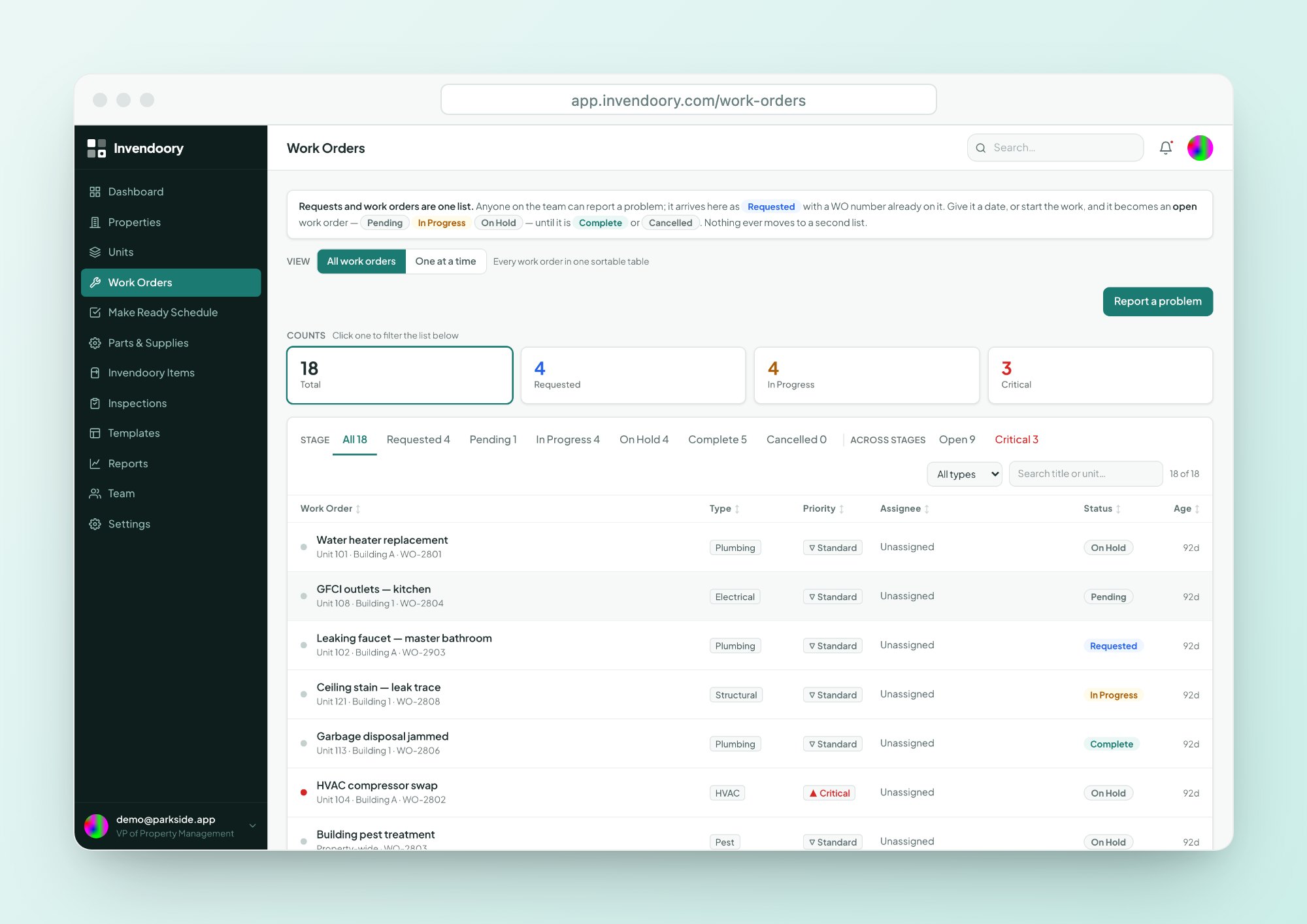
In Invendoory, requests and work orders are one list with one lifecycle: Requested, Pending, In Progress, On Hold, Complete or Cancelled. Anyone on staff can file one, including Leasing.
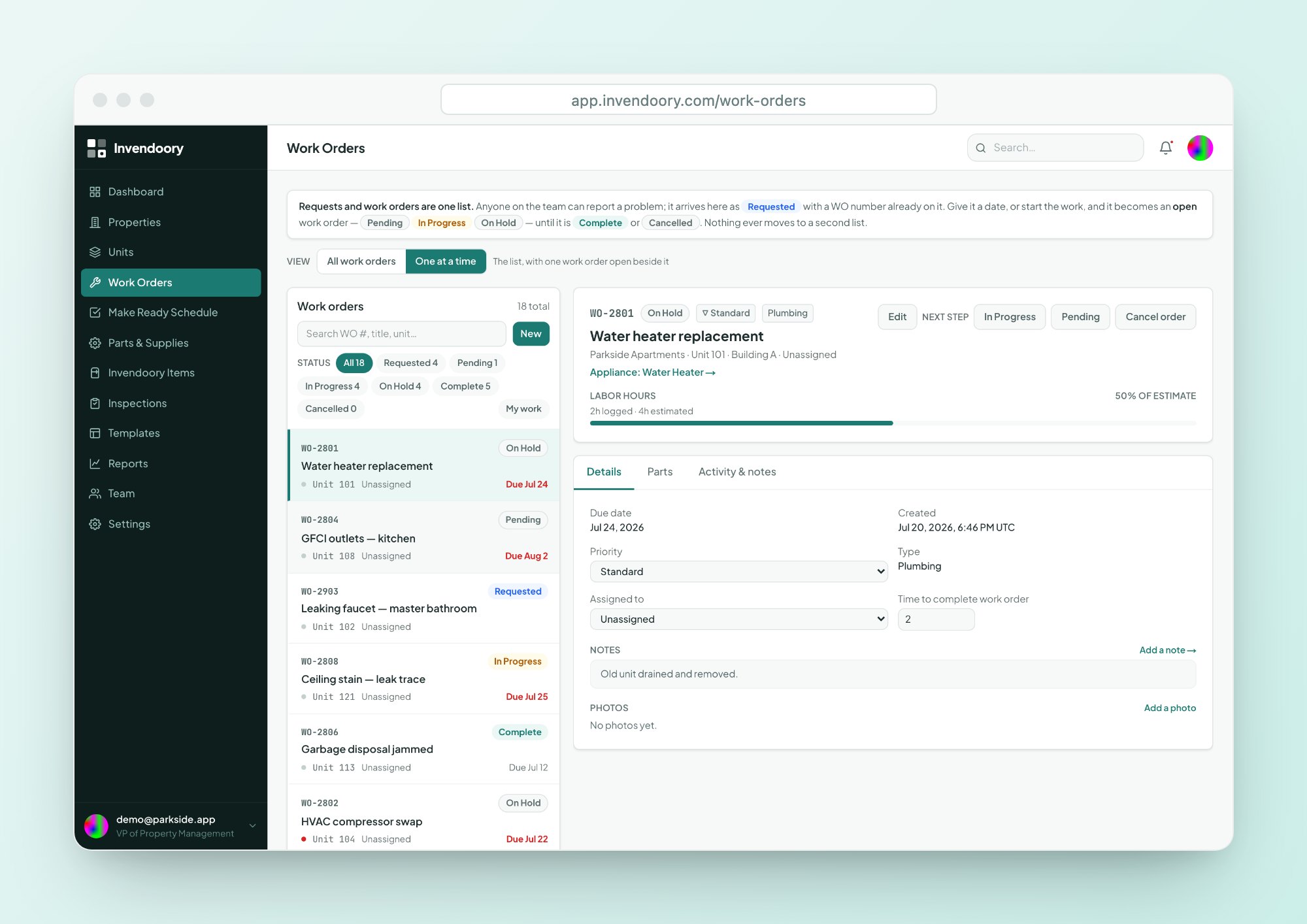
Each work order links to the unit and to the specific appliance. You see its age, warranty and history in the detail panel, so a tech knows the water heater is 11 years old before arriving. See work orders.
- One list with a detail panel
- Linked to the unit and the appliance
- Critical or Standard priority
Parts on the work order, stock on the shelf
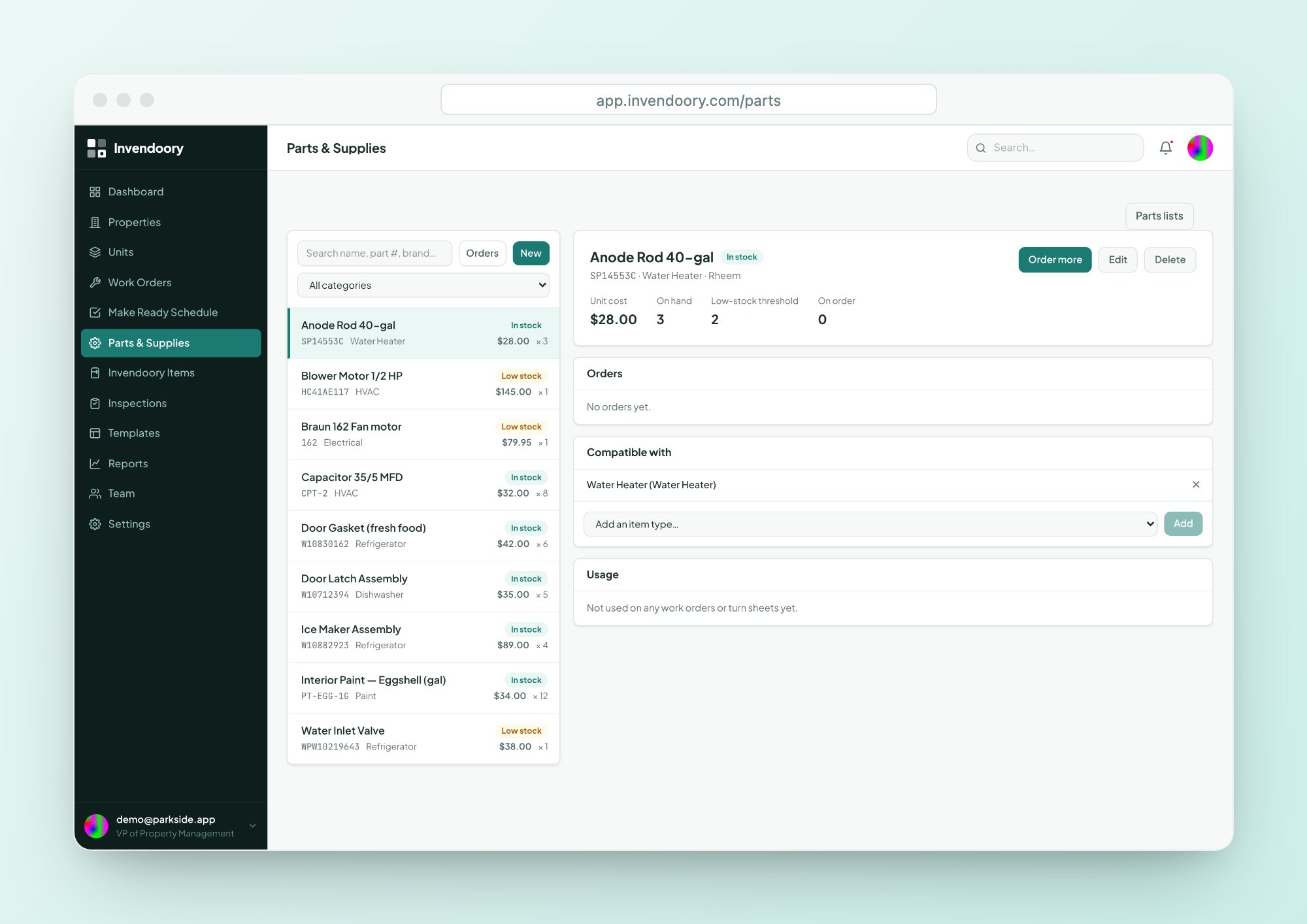
Parts come from the catalog, which reduces stock, or are entered as free text. Parts are linked to item types, so every appliance shows its compatible parts with stock and cost.
Estimated and actual hours, photos and an audited activity history stay on the work order. See Parts & Supplies.
- Catalog with stock and low-stock alerts
- Compatible parts per item
- Estimated and actual hours
Complete a replacement and the record updates
When a tech completes a work order for a replaced appliance, the item’s make, model, serial, value and warranty are updated. The history shows who did it and when.
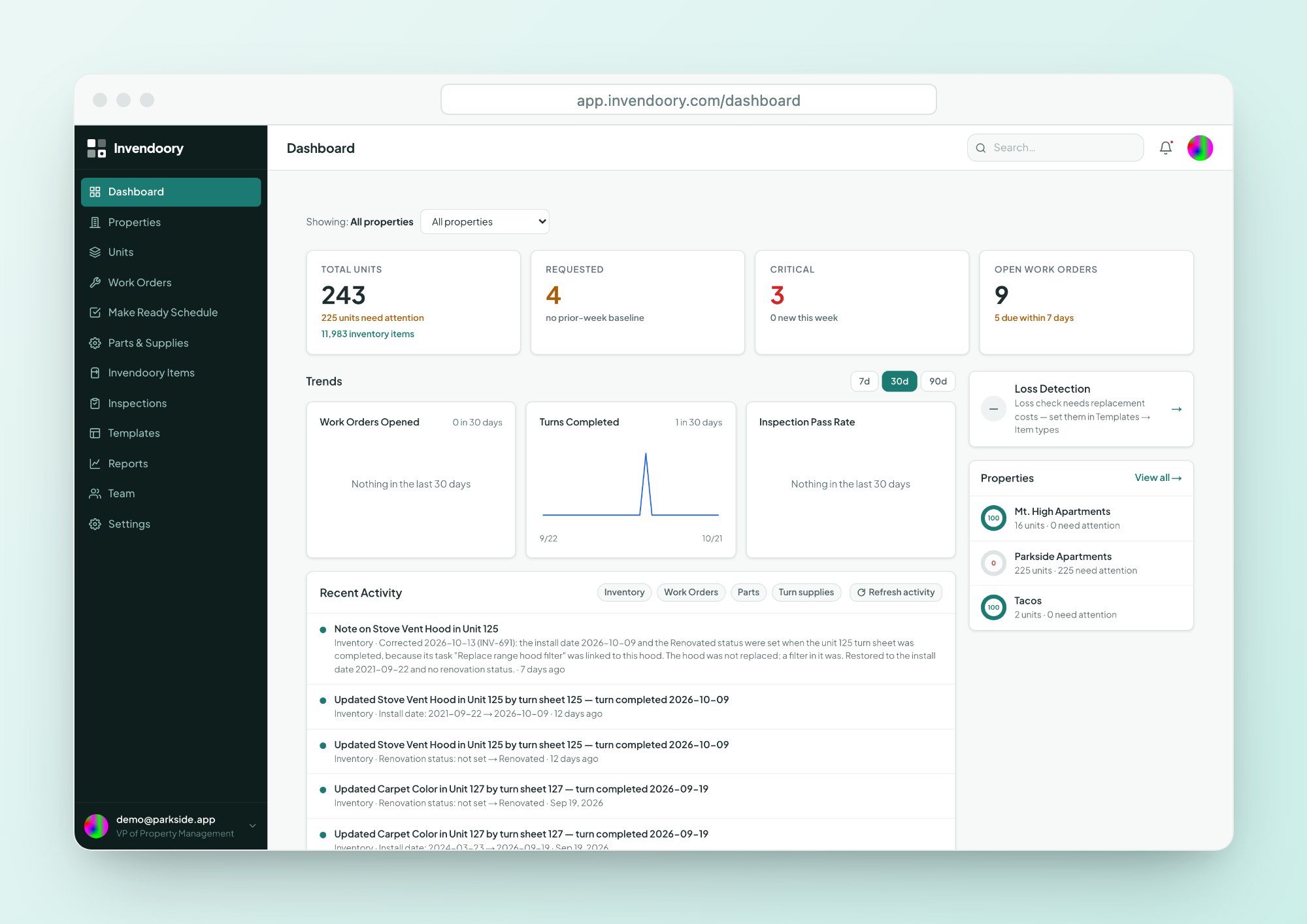
The dashboard rolls up open work orders, critical requests and turns completed, and the Maintenance Performance report breaks results out per technician. Scheduling with residents and vendors is not something Invendoory does.
- Replacement completion updates the item
- Maintenance Performance report per technician
- Dashboard KPI cards click through to rows
Choose Property Meld or Invendoory
One coordinates people around repairs. The other records what is being repaired.
Choose Property Meld if
- Residents and outside vendors need to schedule and message in one place
- You manage 100 or more doors, including single-family
- You need Yardi, AppFolio, Buildium or Rent Manager connections
- You want after-hours call handling as an add-on
Choose Invendoory if
- Your own crew does most repairs
- You want the unit’s installed items behind every work order
- You also need turns, inspections and parts
- You want insurance inventories and move-out charge reports
What Invendoory does not do
Invendoory has no integrations with any property management system. It does not connect to Yardi, AppFolio, RealPage, Entrata or Buildium. You can import units from their exported spreadsheets, and the team can convert your item-level inventory workbooks as a service, but nothing syncs automatically.
It is a responsive web app, not a native or offline app. It needs a connection and runs in your phone’s browser with nothing to install. Sign-in is email and password or an emailed link, with no SSO. Chargebacks are recorded, not billed, and there is no accounting sync.
Invendoory has no resident or vendor logins, no vendor network and no resident scheduling. Residents do not use it directly.
Pricing: what each side publishes
Property Meld publishes a price. Its pricing page lists an Ops plan at $2.00 per unit per month and a MAX On-Call add-on at $1.50 per unit, with a $200 monthly minimum. At 100 units, the Ops plan works out to $200 per month before any add-on.
Invendoory publishes its prices. Basic is $89 per month with 50 units included and $3.00 for each additional unit. Advanced is $350 per month with 300 units included and $1.00 for each additional unit. Advanced costs less once you pass 137 units. See the pricing page for the full breakdown.
The two tools do different jobs, so compare what you would get for the money.
Property Meld alternative questions
Can residents submit requests in Invendoory?
Not directly. Invendoory has staff roles only, and Leasing staff can file a request on a resident’s behalf. There is no resident portal. If residents need to submit, schedule and message themselves, Property Meld is built for that.
Does Invendoory schedule vendors?
No. Invendoory runs work orders for your own team: assigning, priority, hours, photos, parts and notes. It does not have a vendor network or vendor scheduling. Property Meld lists a vendor-facing area called Vendor Nexus.
Is Property Meld or Invendoory cheaper?
It depends on your size and needs. Property Meld lists $2.00 per unit per month with a $200 monthly minimum. Invendoory Basic is $89 per month with 50 units included, plus $3.00 per extra unit, and Advanced is $350 for 300 units. Get quotes for your count.
What is maintenance management software missing without an inventory?
Context. A work order that says “water heater leaking” does not tell the tech the model, age, warranty or compatible part. Invendoory links each work order to the appliance. See centralized maintenance and maintenance KPIs.
Does Invendoory connect to Yardi or AppFolio?
No. Invendoory has no integrations with any property management system. Property Meld lists several. You can import units from an AppFolio or Buildium spreadsheet export, and our team can convert item-level inventory workbooks as a service.
Sources
- Property Meld home page (Product description, segments, feature names.)
- Property Meld pricing (Ops plan, MAX On-Call add-on, minimum, door count guidance.)
- Property Meld integrations (PMS and inspection integrations named.)
- Property Meld: our software (Scheduling and communication.)
Checked October 2026.
Open a work order and see the appliance behind it
Open the live demo, pick a work order and look at the linked appliance, parts and history. No signup, sample data only.