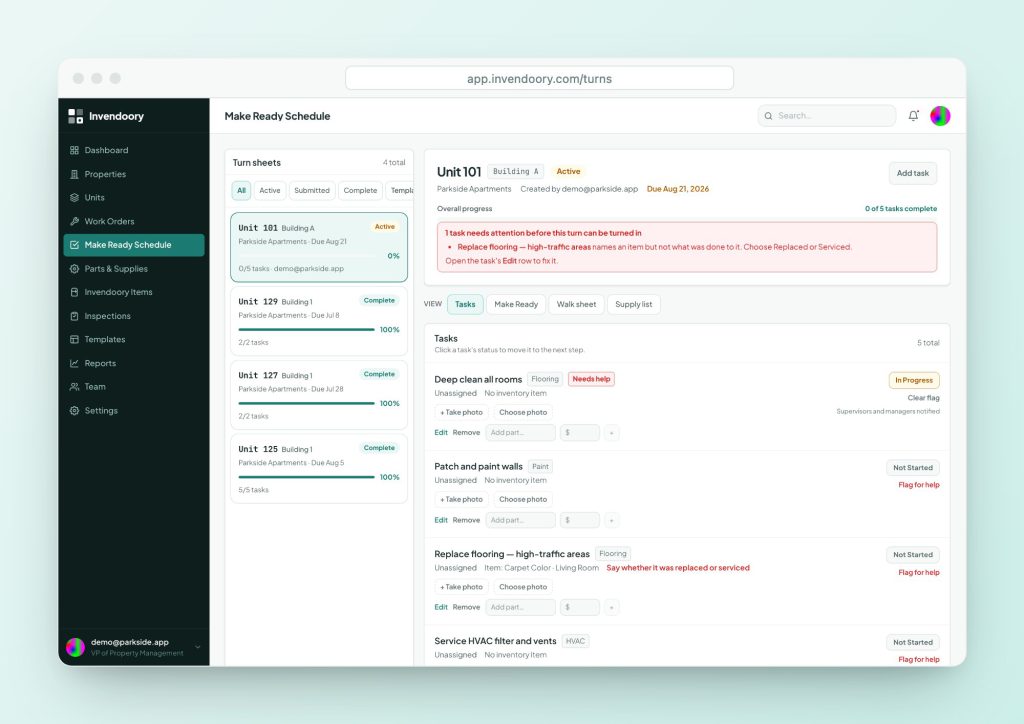
The board shows every vacant unit’s progress on one wall or screen. Here is what it tracks, a free make ready board template you can copy, and when a live schedule does the job better.
What a make ready board is
A make ready board is the status board for vacant apartments. The National Apartment Association (NAA) describes it as a tool maintenance technicians and office staff use to keep track of the tasks needed to restore an apartment after a resident moves out. You mark the status of every leased and unleased unit, so anyone can see what is done and what is next.
The NAA says the two most common types are digital, usually inside property management software, and an ordinary whiteboard. If you searched for an apartment make ready board, you probably want the whiteboard version, and that works fine for a small property. The sections below show how to build one that stays useful.
What the make ready board for apartments should track
A board earns its space by answering four questions at a glance: which units are vacant, who is working each one, what is left, and when it will be ready. Everything else is optional.
- Vacant status. Separate unleased vacant units from leased vacant units. A leased unit has a move-in date and a deadline. An unleased one does not.
- Dates. Move-out date, target ready date and move-in date if leased.
- Stage. Walk, trash and lock, paint, repairs, clean, flooring, final check. Use the same stages for every unit.
- Owner. Who is on the unit today. One name per unit is better than a crew.
- Blockers. Waiting on a part, a vendor or an access date. A blocker column catches the unit that has stalled.
Free make ready board template: units being turned
Copy this into a spreadsheet or draw it on a whiteboard. Tick or date each stage as it finishes, and leave the cell empty until it does.
| Unit | Move-out | Walk done | Trash out + lock | Paint | Repairs | Clean | Carpet / floor | Final check | Ready date |
|---|---|---|---|---|---|---|---|---|---|
| 204 (example) | Oct 3 | Oct 4 | Oct 4 | Oct 6 | Oct 7 | Oct 8 | Oct 9 | Oct 10 due | |
Add a Tech column and a Blocker column if your crew is larger than two or three people.
Priority template: leased vacant units
Leased units carry a fixed move-in date, so keep them on a separate row group and in front of everything else.
| Unit | Move-in date | Days left | Tech | Stage now | Blocker | Final check | Keys to leasing |
|---|---|---|---|---|---|---|---|
How to set up and run the board
Put it where the crew passes it, not in the office. Update it at a set time each morning, and again when a unit’s stage changes. Use one color for in progress, one for blocked and one for ready, and agree what each means.
The NAA also recommends planning ahead. It suggests a pre-move-out inspection once a resident gives notice, ideally within a week of the notice, so parts and contractors are ordered before the unit is empty. Put the unit on the board at notice, not at move-out. A unit that appears only when it is vacant has already lost days.
Print this page for a paper version. The site prints cleanly, so the template tables work as a worksheet if you do not want to draw the grid.
Where a whiteboard breaks down
It only shows now
Wipe the board and the history is gone. You cannot tell which unit ran late last quarter, or why.
It cannot hold detail
There is room for a tick, not for the photo, the appliance model or the supply used.
It lives in one place
Only people in the shop see it. The leasing office and the property manager ask by text.
Nothing flows from it
A finished unit on the board does not update inventory, stock or the resident charge record.
When a live turn schedule replaces the board
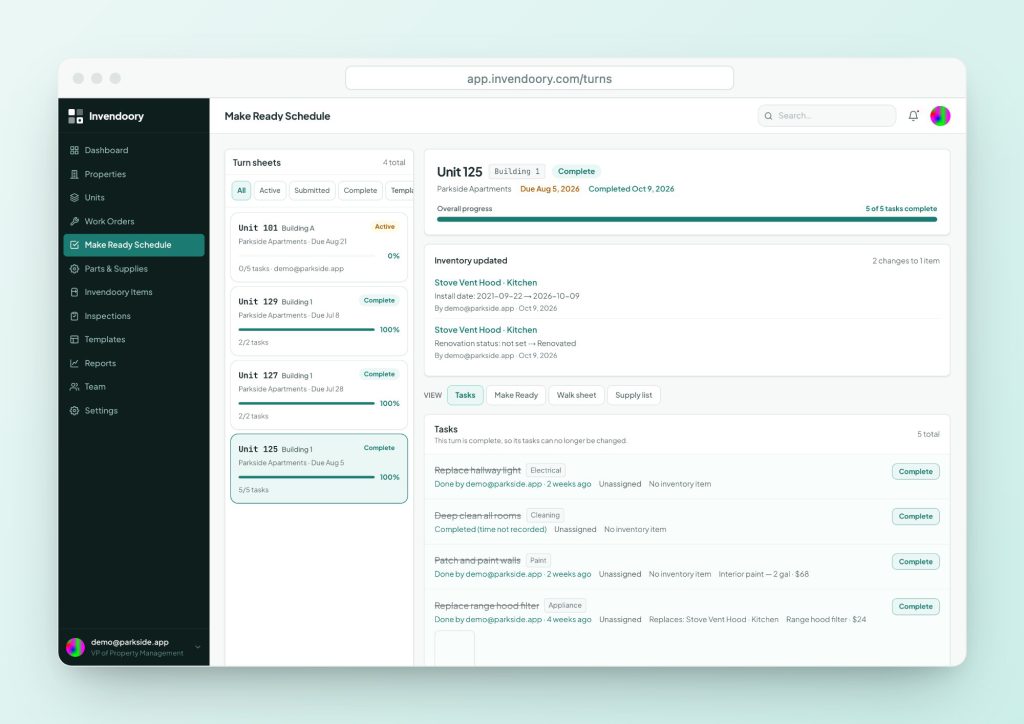
The Make Ready Schedule in Invendoory is the board as a working screen. It lists every active turn sheet with its due date, assigned techs and progress, and changes appear immediately across open screens. Each sheet holds the tasks, notes, phone-camera photos and supplies for one unit.
It is a list of turn sheets, not a kanban board, so you scan it rather than drag cards. Techs mark tasks Not Started, In Progress or Complete. A tech turns the sheet in, and a property manager verifies it. Verification updates stock and the unit’s inventory in one step, which no wall board can do. Learn more on the Make Ready platform page.
- Due date, techs and progress for every active turn
- Updates immediately on every open screen
- Verification updates stock and inventory
Whiteboard or live schedule: which fits
| Situation | Whiteboard is fine | Use a live schedule |
|---|---|---|
| Units | Under about 50, one small crew | Hundreds of units, several sites |
| Who needs to see it | The shop crew only | Leasing, supervisors and the property manager |
| Record you need | None beyond today | History, photos, supplies, replaced items |
| Reporting | Not required | Turn times and tech workload |
| Cost of a wrong status | Low | A leased unit that is not ready on move-in day |
Start with the template, move when it hurts
Nothing here says you must buy software to run a board like this. If the template above keeps your crew on track, use it. Move to a live schedule when the board stops answering questions: when the office keeps asking for status, when you want to know why last month’s turns ran long, or when the supply cart is empty halfway through a unit.
If you are choosing what to track first, the apartment make ready checklist gives you the stages, and what is make ready explains where the board fits in the full turnover cycle.
Questions people ask
What is a make ready board?
It is a whiteboard or digital board showing the status of every vacant or soon-to-be-vacant unit. The NAA describes it as the tool maintenance and office staff use to track the tasks needed to restore an apartment after move-out.
What should be on a make ready board for apartments?
Unit number, move-out date, target ready date, stage, who is working it and any blocker. Keep leased vacant units separate from unleased ones, because leased units have a hard deadline.
Is there a make ready board template I can copy?
Yes. The tables on this page are a free make ready board template. Copy them into a spreadsheet, or draw the same columns on a whiteboard. Print the page if you want a paper copy.
Does Invendoory have a make ready board?
It has the Make Ready Schedule, a live list of active turn sheets with due dates, assigned techs and progress. It is a list rather than a kanban board, and each sheet carries tasks, photos and supplies.
Can I keep a whiteboard alongside the schedule?
You can, but you will not need to. The schedule is the shared record. Some teams keep the wall board for a glance in the shop and treat the sheets as the source of truth.
How often should the board be updated?
Update it whenever a stage changes and at least once a day. A board that is a day behind is worse than none, because people trust it.
Sources
Checked October 2026.