A quarterly inspection walks the whole site and a sample of units on one scored form. This quarterly property inspection checklist is based on the forms Invendoory was built from. Print it, or run it in the app.
What a quarterly inspection covers
A quarterly inspection is a scheduled walk of the property’s public and shared spaces, plus a small sample of units, scored on a fixed form so quarters can be compared. Corporate teams and owners use it to see whether a community is being kept up between annual unit walks. If you are looking for a site inspection checklist for apartments, this is the shape that works: sections for each area, a short list of questions in each and a score at the end.
The form below follows the Quarterly Site Inspection that ships as an example in Invendoory. It was derived from the operator’s scored site-inspection sheet that the product was built from. Edit it for what your community has. Drop the pool section if you have no pool.
Print this page. The site prints cleanly, so each table is a worksheet. Score every item, add a note and a photo for anything weak.
Sampling units: how many to walk
The property sections cover the whole site. Units are sampled. The starter form’s rule asks for 5 percent of the property’s units, rounded up, and applies it separately to vacant units and to occupied units. The same 5 percent applies to every size band in the starter (60 to 135 units, 136 to 175 and 176 or more). When you schedule an inspection you can override the suggested count.
- 120 units: 6 vacant and 6 occupied
- 150 units: 8 vacant and 8 occupied
- 225 units: 12 vacant and 12 occupied
Choose the sample at random or by a rule you can explain, such as one per floor or building, so nobody can say the best units were picked. Record which units you walked so next quarter’s sample is different.
How scoring works
This is how Invendoory computes it. On paper, use the same math: points earned over points possible, per section.
1. Rate each item
Rated items use 0 to 5. Yes/no items are passes or fails.
2. Score the section
The app adds each rated answer as a share of 5 and shows a percent per section.
3. Flip the negative questions
Some questions are inverted, such as trip-and-fall areas or abandoned vehicles, where Yes is bad. Mark them so a Yes raises the concern.
4. Raise concerns
A low rating or a failing answer becomes an area of concern, with a photo and a note.
5. Compare quarters
The score alone means little. The trend per section is the point.
Property entrance and market window
| Done | Item | Answer |
|---|---|---|
| ☐ | Overall curb appeal: your first impression | Score 0-5 |
| ☐ | Monument condition and cleanliness (any wood rot?) | Score 0-5 |
| ☐ | Curb paint and speed bump paint | Score 0-5 |
| ☐ | Flags and banners | Score 0-5 |
| ☐ | Correct hours posted on the front door | Yes / No + photo |
Leasing office
| Done | Item | Answer |
|---|---|---|
| ☐ | Office orderly and clean | Yes / No |
| ☐ | Files kept in a locked cabinet | Yes / No |
| ☐ | Entry doors and windows clean, locking well | Yes / No |
| ☐ | Lighting works; bulbs all the same color temperature | Yes / No |
| ☐ | Condition of the furniture | Score 0-5 |
| ☐ | Paint condition of the leasing office | Score 0-5 |
| ☐ | Restrooms clean and stocked | Yes / No |
| ☐ | Maps, floor plans and brochures available | Yes / No |
| ☐ | Staff contact list up to date | Yes / No |
| ☐ | Employees wearing name tags | Yes / No |
| ☐ | Package and storage rooms organized | Yes / No |
| ☐ | Fair Housing plaque and photo ID sign visible | Yes / No |
| ☐ | Required labor law posters displayed and current | Yes / No |
| ☐ | Key control records up to date | Yes / No |
| ☐ | Petty cash and receipts kept in a secured place | Yes / No |
| ☐ | Secured rent drop box | Yes / No |
| ☐ | Safe, and where it is located | Yes / No |
Clubhouse and business center
| Done | Item | Answer |
|---|---|---|
| ☐ | Clubhouse appearance: clean and fresh-smelling | Score 0-5 |
| ☐ | Entry doors and windows locking well | Yes / No |
| ☐ | Lighting works | Yes / No |
| ☐ | Furniture condition | Score 0-5 |
| ☐ | Paint condition | Score 0-5 |
Fitness center
| Done | Item | Answer |
|---|---|---|
| ☐ | Gym orderly and clean | Score 0-5 + photo |
| ☐ | Entry doors and windows locking well | Yes / No |
| ☐ | Lighting works | Yes / No |
| ☐ | Equipment in good condition | Yes / No |
| ☐ | Paint condition | Score 0-5 |
Maintenance shop
| Done | Item | Answer |
|---|---|---|
| ☐ | Shop clean and orderly | Score 0-5 + photo |
| ☐ | Entry doors and windows locking well | Yes / No |
| ☐ | Cameras or audible alarms | Yes / No |
| ☐ | Lighting works | Yes / No |
| ☐ | Supplies labeled and organized | Yes / No |
| ☐ | Hazardous chemicals in a fireproof cabinet | Yes / No |
| ☐ | First aid kit and eye wash station accessible | Yes / No |
| ☐ | Maintenance team wearing name tags | Yes / No |
| ☐ | Shirts and jackets clean and presentable | Yes / No |
Laundry rooms
| Done | Item | Answer |
|---|---|---|
| ☐ | Clean behind the washers and dryers | Yes / No |
| ☐ | Entry doors and windows locking well | Yes / No |
| ☐ | Lighting works | Yes / No |
| ☐ | Equipment condition | Score 0-5 |
| ☐ | Paint condition | Score 0-5 |
Common areas
| Done | Item | Answer |
|---|---|---|
| ☐ | Trash cans orderly, free of strong odors | Yes / No |
| ☐ | Mailbox condition and cleanliness | Score 0-5 |
| ☐ | Pet waste stations stocked | Yes / No |
| ☐ | General landscape condition | Score 0-5 |
| ☐ | Gates and fencing | Score 0-5 |
| ☐ | Play equipment free of graffiti | Yes / No |
| ☐ | Concrete trip-and-fall areas noted | Yes / No (No is the concern) |
| ☐ | Utility closets free of debris and liabilities | Yes / No |
| ☐ | Building exterior and hallways: paint, doors, lighting | Score 0-5 |
| ☐ | Stored or abandoned vehicles (flat tires, expired tags) | Yes / No (No is the concern) |
Pools and spas
| Done | Item | Answer |
|---|---|---|
| ☐ | Signage visible and showing current local code | Yes / No + photo |
| ☐ | Gates self-closing (if not, repair immediately) | Yes / No |
| ☐ | Lifesaving equipment condition | Score 0-5 |
| ☐ | Deck condition and cleanliness: plaster cracks, chips | Score 0-5 |
| ☐ | Pool shower condition and cleanliness | Score 0-5 + photo |
| ☐ | Daily pool logs up to date | Yes / No |
Models
| Done | Item | Answer |
|---|---|---|
| ☐ | Model clean and fresh-smelling | Yes / No |
| ☐ | Entry doors and windows locking well | Yes / No |
| ☐ | Lighting works | Yes / No |
| ☐ | Furniture condition | Score 0-5 |
| ☐ | Paint and carpet condition | Score 0-5 |
| ☐ | Patio or balcony condition | Score 0-5 |
| ☐ | Heat or A/C set comfortably | Yes / No |
Vacant rent-ready units (sampled)
Walk the sampled vacant units against this list. The occupied-unit form is the same without the turn-time question and carries the same safety checks.
| Done | Item | Answer |
|---|---|---|
| ☐ | Made ready within the target turn time | Yes / No |
| ☐ | Entry doors and windows locking well | Yes / No |
| ☐ | Lighting works | Yes / No |
| ☐ | Paint condition; noticeable patches | Score 0-5 |
| ☐ | Carpet shampooed or replaced (describe) | Text |
| ☐ | Patio or balcony condition | Score 0-5 |
| ☐ | Plumbing: supply lines, toilets flush, hot water adequate | Yes / No |
| ☐ | Anti-tip installed on the stove | Yes / No |
| ☐ | Smoke detectors work | Yes / No |
| ☐ | CO detectors installed, one per floor, if gas appliances | Yes / No |
Run the quarterly inspection in Invendoory
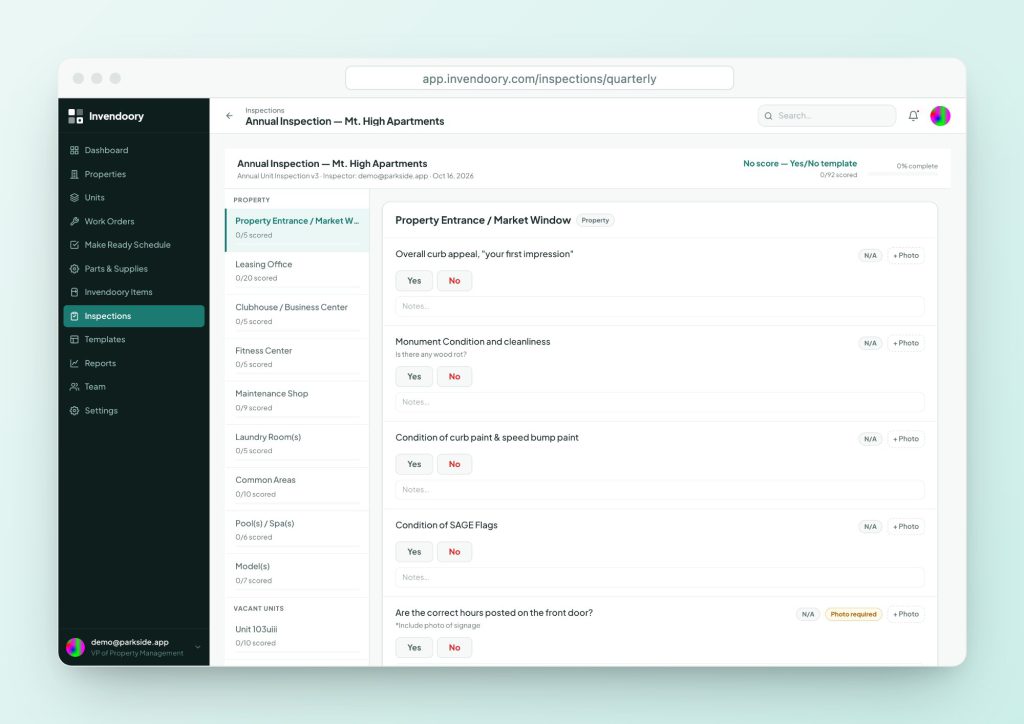
The Quarterly Site Inspection is one of three example templates a new organization starts with. When you schedule it, pick the scope: the full property, sampled units, a single unit, all units or hand-picked units. The app suggests the sample size from the rule and lets you override it.
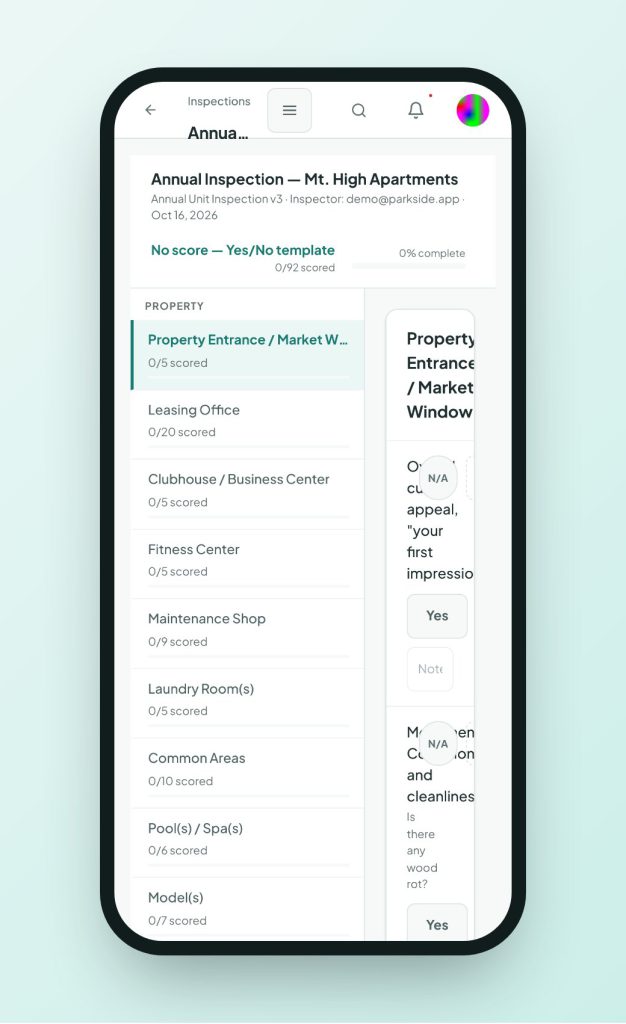
Inspectors answer on the phone, mark N/A, add notes and take photos with capture timestamps. Items marked photo required show a badge. Score and progress update live. Low ratings raise areas of concern automatically, and each concern becomes a work order or turn task in one step. The inspector and the community manager sign, then a manager submits with comments.
- Sampled units with a size-based rule
- Section scores that update live
- Concerns become work orders or turn tasks
- Two sign-offs, then submit
Report and trend
The inspection report shows overall and section scores, concerns, sampling, any chargeback total and embedded photos, and it prints. The Quarterly and Annual Reports roll up inspections walked, work orders and turns completed and chargebacks for the period. See the inspection report template and the inspections platform page.
Questions people ask
What is a quarterly inspection?
It is a scheduled, scored walk of a community’s common areas plus a sample of units, done four times a year. The aim is to catch slippage between annual unit inspections and give owners a comparable score.
How many units should a quarterly property inspection cover?
The starter template in Invendoory samples 5 percent of units, rounded up, for vacant and occupied units separately. Your owner or lender may require a different rate. Set it per property size.
What is the difference between a quarterly inspection and an annual unit inspection?
Quarterly covers the site and a unit sample. Annual walks the interior of units, up to every unit. See the annual unit inspection checklist.
Is a site inspection checklist different from a property inspection checklist?
In practice they are the same thing. A site inspection is the walk of grounds, amenities and common areas. A property inspection may include units too.
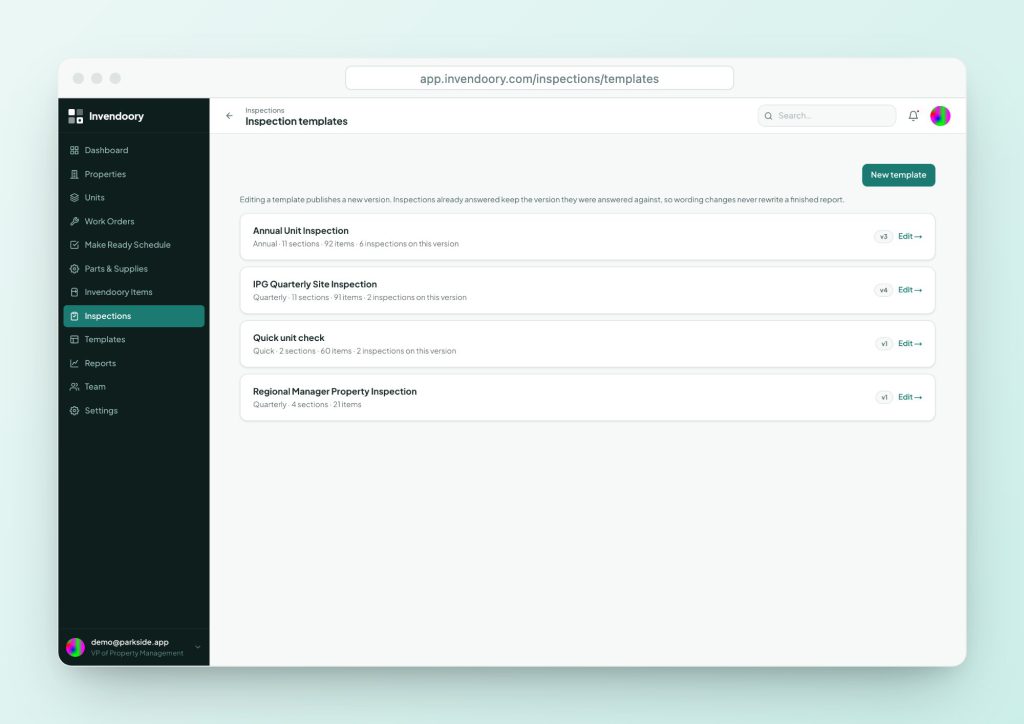
Can the quarterly form be customized?
Yes. Editing a template publishes a new version, and past inspections keep the exact wording they were answered with. Remove sections you don’t have and reword items for your standards.
Do yes/no answers affect the score?
In Invendoory the score percent comes from 0 to 5 and letter-grade answers. Yes/no answers still count toward progress and raise concerns, but they don’t move the percent.
Sources
Checked October 2026.