A statement of values (SOV) is the schedule your broker sends to insurers at renewal. This guide covers what goes on it, where the numbers come from, and how a unit-level inventory backs them up.
What a statement of values is
A statement of values is a schedule of the property you want insured and the value assigned to each location or building. Underwriters use it to set coverage limits, judge risk and calculate premiums. Brokers often call it a schedule of values, and the terms are used interchangeably.
The building line is usually the most important entry, and the goal is to estimate what it would cost to rebuild, not what the property would sell for. Many schedules also list business personal property, meaning contents and equipment, plus income exposures such as loss of rents.
This matters because errors cut both ways. Wrong values can leave a property over-insured or under-insured. This article is general information about statement of values insurance practice. Your broker and carrier decide what their form requires, and your policy language controls.
Columns on a typical apartment statement of values
Every carrier has its own form. These are the fields that show up across published schedules, including a sample apartment schedule with building, equipment and loss-of-rents values.
| Column | What it captures |
|---|---|
| Address and location | Each building listed separately, including detached garages, clubhouses and maintenance sheds |
| Occupancy or use | Residential apartments, plus any retail or office space in the building |
| Construction class | The ISO construction class, which reflects how combustible the building is |
| Year built and stories | Original construction year and number of stories |
| Units and square footage | Unit count and total building area |
| Roof | Roof type and the year it was last replaced |
| Protection class | Fire protection rating for the location |
| Building value | Estimated cost to rebuild |
| Contents and equipment | Business personal property, such as furniture, appliances and maintenance equipment |
| Loss of rents | Rental income exposure if units are uninhabitable |
Fields vary by insurer. Use the form your broker provides.
Where statement of values insurance schedules go wrong
Three problems come up again and again. Buildings get left off, such as a detached garage or an equipment shed. Contents and equipment are excluded or guessed, even though a building is only part of the exposure. And values go stale: the schedule from two renewals ago still carries a roof date, a unit count or an appliance count that no longer matches the property.
Coverage outcomes always depend on policy language, limits, coinsurance provisions and endorsements, so an understated value is a risk worth discussing with your broker. Ask how your policy values losses, replacement cost or actual cash value, because that decides which numbers matter most.
How a unit inventory supports your multifamily insurance schedule
A statement of values is a property-level document. A loss is item-level. After a fire or a burst pipe, the adjuster asks what was in the unit, what it was and how old it was. If you can answer from a current record, the claim conversation starts on firmer ground.
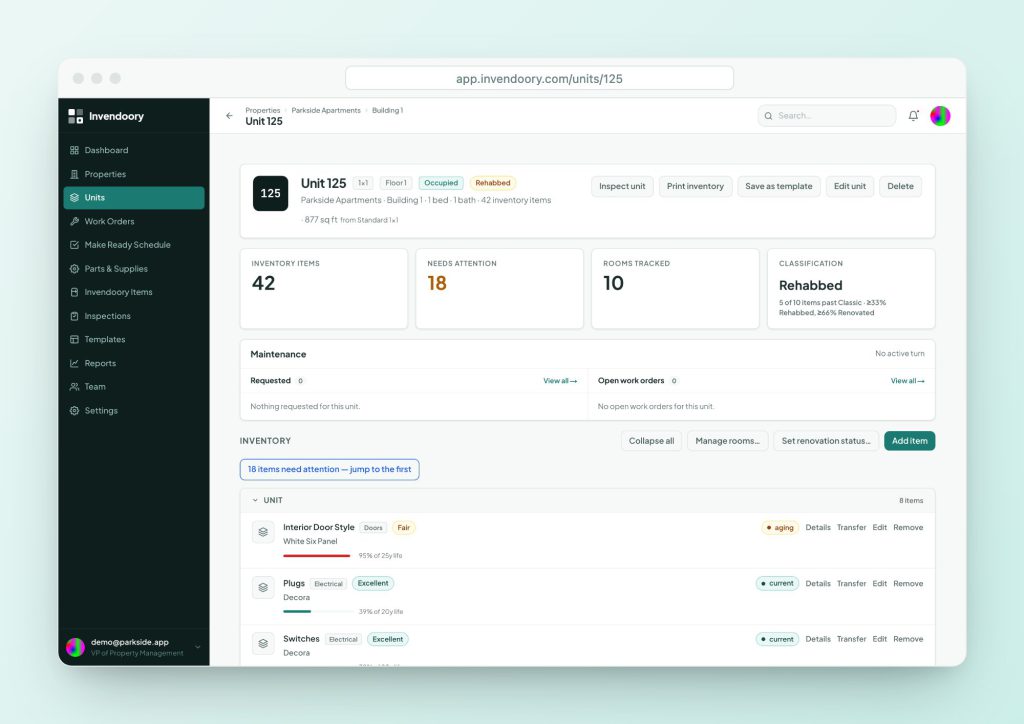
Invendoory records each unit room by room: appliances, finishes, fixtures, cabinets, countertops and floors, with make, model, serial, install date, expected life and photos. That is the detail behind the contents and building-component lines on your schedule, and it is the kind of insurance inventory an adjuster asks for.
- Make, model and serial per item
- Install date and expected life
- Up to 20 photos per item
What the Insurance Inventory Report gives you

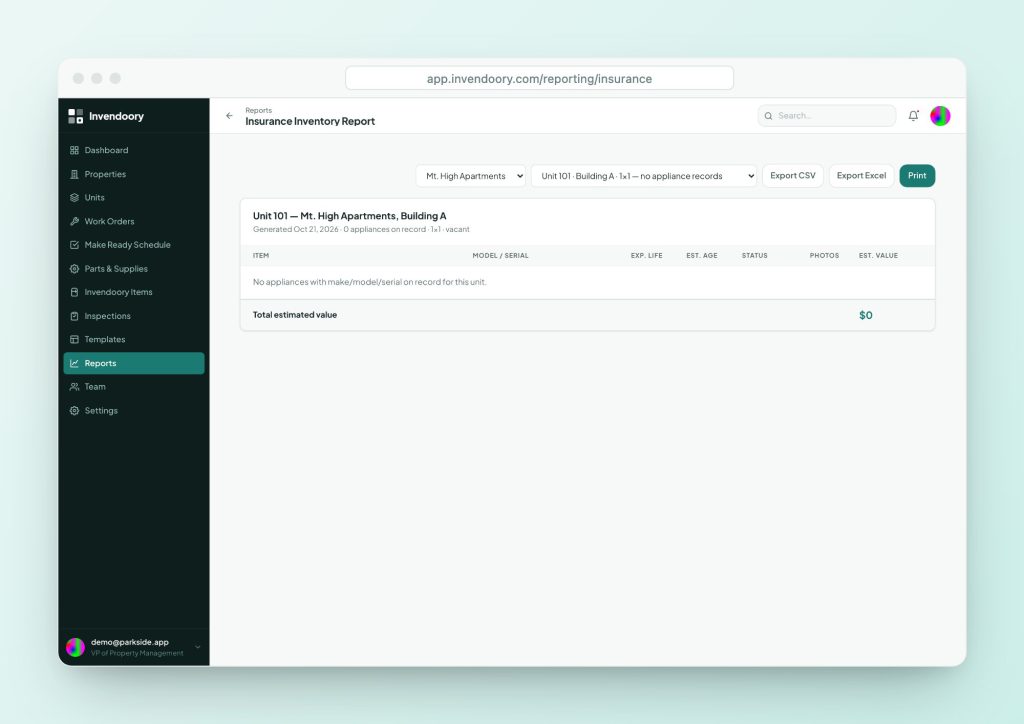
The Insurance Inventory Report lists, for every unit, each item with its model and serial, age, expected life, status, photos and an estimated depreciated value. It exports to CSV and Excel, and a single unit’s inventory can be printed room by room from the browser.
Be clear about what it is not. It is not an insurer’s SOV form, and it does not fill in your carrier’s template. It does not produce building replacement cost, construction class or a rebuild estimate. Those come from your broker, a valuation tool or an appraiser. The report supplies item-level data you can drop into the template your carrier sends.
The value shown is an estimate based on age and expected life, so it reads closer to depreciated value than replacement cost. Ask your broker which basis your policy uses.
- Per-unit list of every recorded item
- Estimated depreciated value per item
- CSV and Excel export, printable unit inventory
A practical prep list before the schedule goes out
1. Reconcile buildings
List every structure, including garages and storage, against your last schedule. Add what is missing and remove what you sold.
2. Confirm building facts
Check year built, stories, unit count, square footage and the year each roof was last replaced.
3. Pull the item data
Export the item list for contents and equipment. Check that big-ticket items have dates and photos.
4. Review values with your broker
Walk through how your policy values a loss and whether your building value reflects today’s rebuild cost.
Keep the record current between renewals
A schedule built once a year goes out of date the day it is sent. For statement of values insurance renewals, inventory that updates as work happens does not. When a manager verifies a turn, replaced items become new installs dated that day, and completing a work order for a replacement updates make, model, serial, value and warranty.
The report depends on what is recorded. An appliance that was never entered will not appear, so close those gaps first. See how onboarding works for bringing in existing spreadsheets.
Statement of values questions
What is a statement of values?
It is a schedule of the property you want insured, with a value for each location or building. Underwriters use it to set limits, assess risk and price coverage. Some carriers and brokers call it a schedule of values. Your broker will tell you which form to complete.
How often should I update it?
Most owners update it at every renewal, and again after a major change such as a new building, an addition or a large renovation. Ask your broker about your carrier’s requirements. Keeping inventory current between renewals makes each update faster.
Does the SOV include appliances and contents?
Many schedules include business personal property, such as furniture, equipment and appliances you own, in addition to the building. Whether and how contents are covered depends on your policy. Confirm with your broker.
Is the Insurance Inventory Report an SOV?
No. It is an item-level inventory with estimated depreciated values for each unit. It does not fill in a carrier’s SOV form or estimate rebuild cost. It gives you accurate item data to use alongside the form your broker provides.
What is the difference between replacement cost and depreciated value?
Replacement cost is what it takes to replace an item with a new equivalent. Depreciated value subtracts wear based on age and life. Policies can value losses either way, so ask your broker which basis applies to your coverage.
Sources
- PRIMA, How an Accurate Statement of Values Can Secure the Proper Insurance Coverage
- Wexford Insurance, What Is a Schedule of Values in Commercial Property Insurance?
- Sample apartment application schedule (xinsurance.com) (Example of apartment schedule columns. Forms vary by insurer.)
Checked October 2026.