Good capital planning turns surprise replacements into a schedule. This guide shows how apartment operators separate unit interiors from building systems and use remaining life to build a capex forecast.
Why replacements feel like emergencies
Most teams know the roof is old. Fewer can say how many refrigerators will age out next year. So replacements arrive one work order at a time, the maintenance budget absorbs them, and the capex budget is a number someone carried over from last year.
Capital planning fixes that by answering three questions early: what do we have, how much life is left in it, and what will it cost to replace. The answers let you spread cost across years instead of paying for a bad quarter all at once.
This guide is general information on multifamily capex planning. Tax treatment and lender requirements vary, so confirm them with your CPA and lender.
Unit interiors vs building systems
Capital planning treats the two categories differently, because the data behind them is different.
Unit interiors are the items inside apartments: appliances, water heaters, flooring, cabinets, countertops, blinds and in-unit HVAC. There are hundreds or thousands of them, they age in a predictable way, and an item-level record can forecast them by counting.
Building systems are roofs, paving, elevators, boilers, fire panels and similar assets. There are far fewer, each costs a lot, and condition varies with climate and maintenance. An engineer or a property condition assessment usually sets the schedule.
Both belong in one capex budget. They simply come from different sources, and mixing the two leaves gaps.
What counts as capital spending
For tax purposes, IRS Publication 527 says you must capitalize an expense that results in a betterment, restores the property or adapts it to a new use. A repair that maintains the property may be deductible instead. The publication lists a new roof, flooring and central air conditioning as improvements.
That is the tax view. Your operating view may draw the line differently, for example by a dollar threshold per item. Pick a rule, write it down and apply it the same way across properties, or your budget comparisons will not mean much. Ask your CPA how safe harbors and thresholds apply.
Capital planning method: build a capex forecast from remaining life
1. Inventory what is installed
Record each item with make, model, install date and expected life. You cannot forecast what is not on the list.
2. Work out remaining life
Remaining life is expected life minus age. Group items by the year they reach the end of it.
3. Price each replacement
Use your own recent invoices, not list prices. Update the numbers each budget cycle.
4. Adjust for condition
An item at 90% of its life in great shape can wait. One at 50% that keeps failing may not. Use judgment and service history.
5. Set the capex budget
Roll the forecast into a yearly budget by category, then smooth the lumps across years where you can.
A three-year capex forecast, from item counts
An illustrative 300-unit property. The counts show items reaching the end of expected life in each year. Replacement costs are example figures.
| Item (example cost) | Year 1 | Year 2 | Year 3 |
|---|---|---|---|
| Water heaters ($1,100) | 18 units, $19,800 | 25 units, $27,500 | 40 units, $44,000 |
| Refrigerators ($1,200) | 22 units, $26,400 | 35 units, $42,000 | 28 units, $33,600 |
| Dishwashers ($600) | 30 units, $18,000 | 12 units, $7,200 | 45 units, $27,000 |
| Total | $64,200 | $76,700 | $104,600 |
| Per unit | $214 | $256 | $349 |
Illustrative numbers only. This is an example, not a benchmark or a forecast for any real property.
Where the remaining-life numbers come from
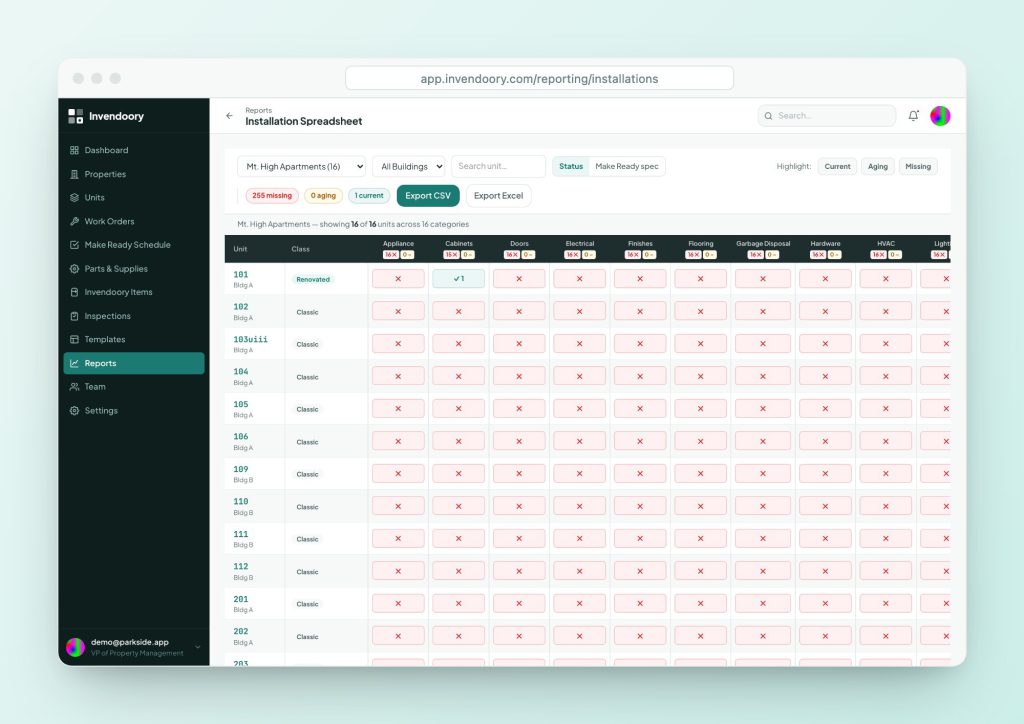
The forecast above needs a count of items by year. Invendoory records each item’s install date and expected life, shows a life used bar for every item (green under 60%, amber at 60-80%, red above 80%) and shows years of life left. The Units table can add per-category columns that show the installed item and its years left, so you can see a whole property at once.
The Installation Spreadsheet gives a color-coded grid of units by asset category and exports to CSV and Excel, where you can total counts by year and apply your own costs. Invendoory does not write the forecast for you, so the math and the prices stay under your control.
Expected life figures are a starting point. Published averages, such as the National Association of Home Builders’ 2007 study (refrigerators 13 years, dishwashers 9, gas water heaters 10), are general guidance, not guarantees. Use your own history where you have it.
- Install date and expected life per item
- Life used bar and years left
- Installation Spreadsheet export to CSV and Excel
Capital planning only works if you track the capex budget
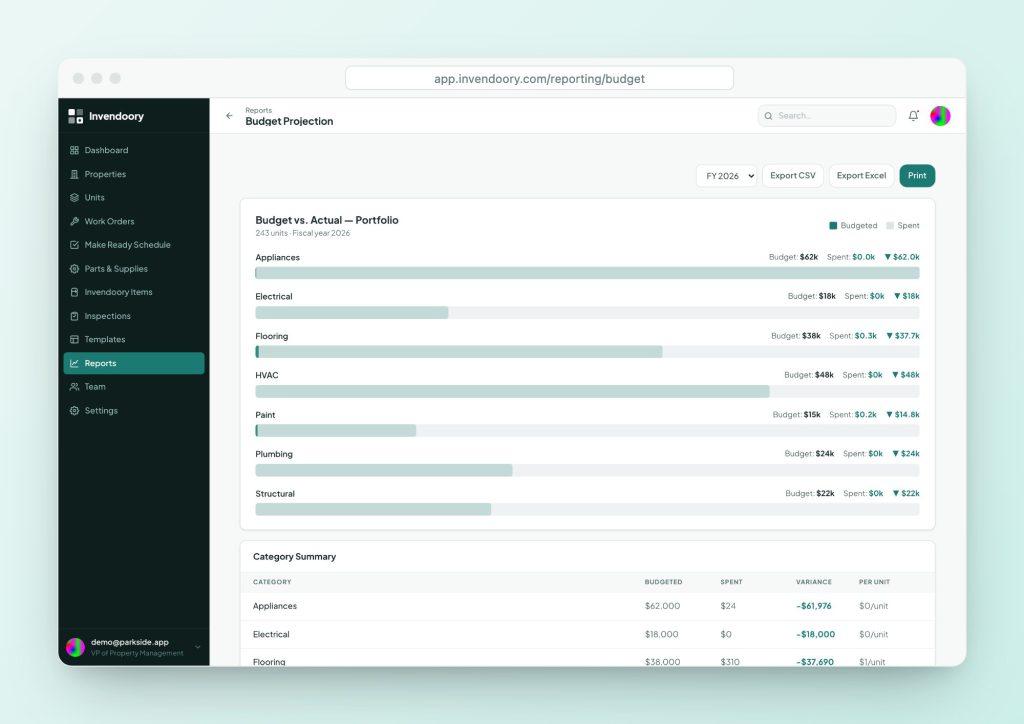
A plan only works if you check it. Budget Projection lines up budget against recorded spend for each category and fiscal year, with variance and cost per unit. Budget targets come in through data import, since there is no in-app budget editor, and spend is recorded as work happens. Our guide to budget vs actual explains how to read the variance.
Notifications arrive when a category reaches 80% and again at 100%, so you hear before the overrun, not after. Cost per unit lets you compare a 300-unit property with an 80-unit one fairly.
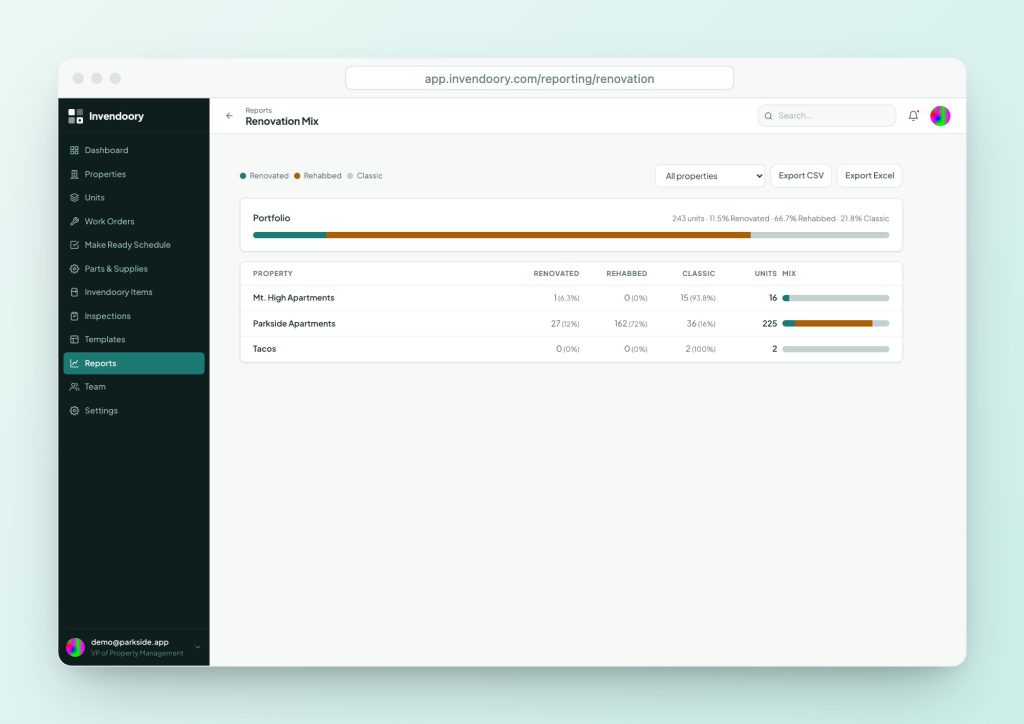
For unit interiors, the Renovation Mix report counts Classic, Rehabbed and Renovated units, so a program has a count behind it. It does not hold a renovation budget, so pair it with Budget Projection.
- Budget vs actual by category and fiscal year
- Notifications at 80% and 100% of a category
- Renovation Mix counts by property and portfolio
Capital planning for building systems: do not skip the big assets
A unit-level forecast covers the interiors. Roofs, paving and mechanical plants need their own schedule from an engineer or a property condition assessment, and your lender may require one. Lender reserve requirements and terms vary by loan, so check yours. A reserve study is the usual way to schedule those big assets.
Add those line items to the same capex budget with a year and an estimated cost. Then one view shows the whole picture, and unit replacements stop competing with a roof for money nobody planned to spend.
Capital planning questions
What is the difference between capex and repairs and maintenance?
Repairs keep an asset working. Capital spending replaces or improves it. IRS Publication 527 treats a betterment, restoration or new use as an improvement to capitalize. Your own threshold may differ, so set a written policy and confirm tax treatment with your CPA.
How far ahead should we forecast?
Most operators look at least three to five years for unit interiors, where item counts are reliable, and longer for building systems. The further out, the rougher the estimate. Revisit it every budget cycle as items are replaced and costs change.
How do I know when an appliance should be replaced?
Combine age and condition. Life used shows how far along the item is, and Invendoory’s Repair, Monitor or Replace guidance comes from fixed age and condition rules, not AI. A manager decides. Service history, warranty and parts cost belong in the call.
Can Invendoory build my capex budget?
No. It records items and their remaining life, tracks spend against budget targets you import, and exports to CSV and Excel. You build the forecast and the budget. That keeps prices and priorities in your hands.
Do reserves and capex budgets differ?
A replacement reserve is money set aside, often required by a lender. A capex budget is what you plan to spend in a year. A good forecast informs both. Ask your lender and CPA how your reserve is held and reported.
Sources
- IRS Publication 527, Residential Rental Property (Repairs vs improvements; examples of capital improvements.)
- NAHB, Study of Life Expectancy of Home Components (2007) (Refrigerator 13 years, dishwasher 9 years, gas water heater 10 years. The study states the figures are not guarantees.)
Checked October 2026.